The right Google Meet background for every meeting.
Pick Background reads your Google Meet title in the green room and automatically applies the matching virtual background — so client calls get the client backdrop, standups get your studio, and you never fiddle with the picker again.
Free for one rulePro from $5/moLifetime $100 one-time
How it works
Three steps, then forget it's there.
Set a rule once. Pick Background applies the right virtual background every time that meeting comes around.
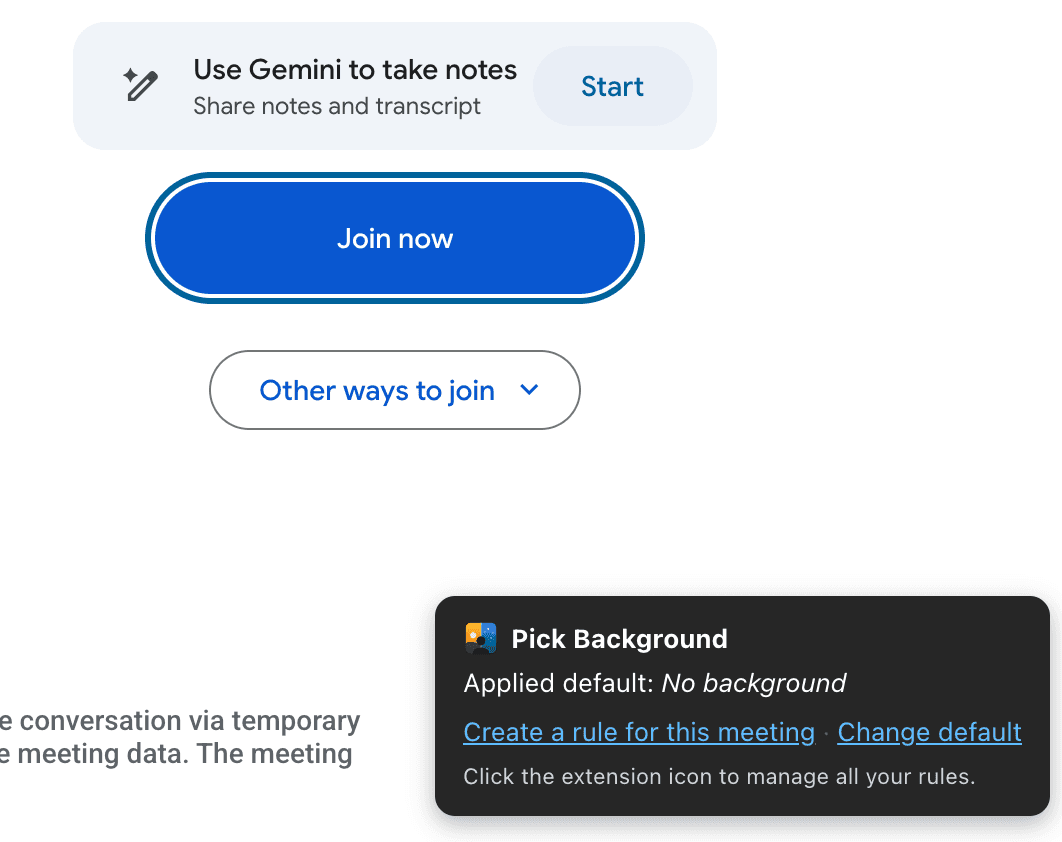
Land on the green room
On Google Meet's preview screen, Pick Background reads the meeting title and tells you whether a rule matches.
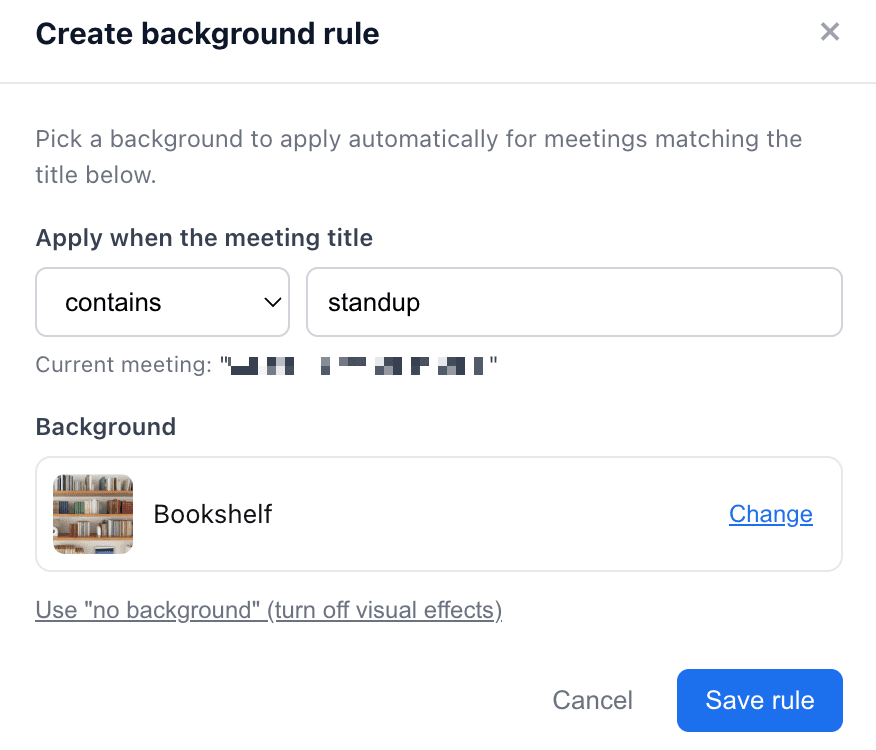
Create a rule in one click
Pattern is pre-filled from the meeting title. Pick a background from the tiles already in Meet's picker. Save.
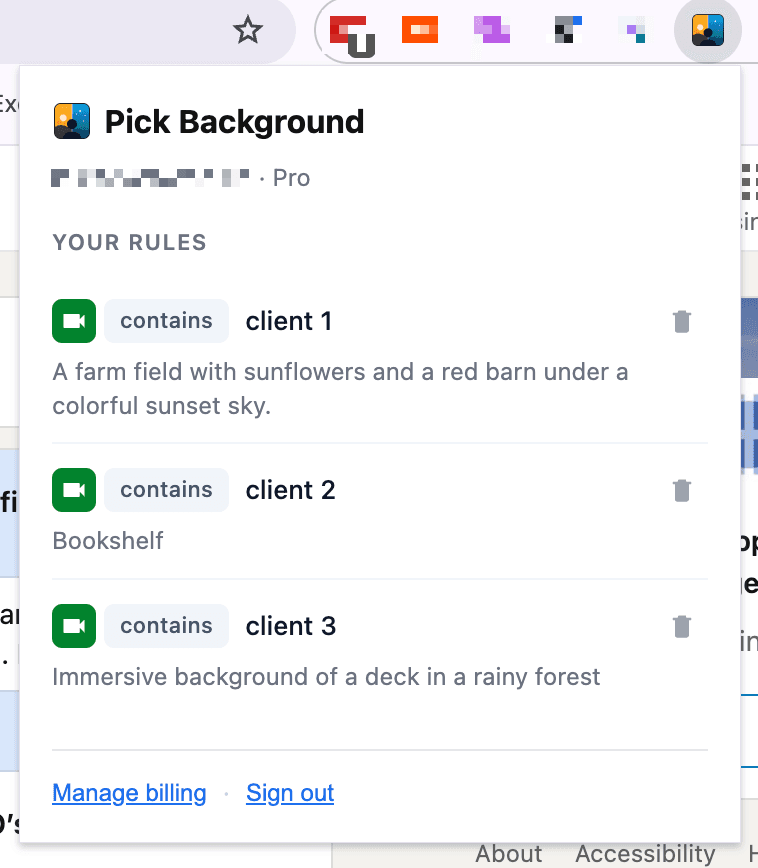
Auto-apply, forever
Every recurring meeting now gets the matching background — automatically, before you join. Manage all rules from the popup.
Who it's for
Built for Google Meet regulars who context-switch all day.
Consultants & contractors
Different client, different brand. Map each client's meeting name to a matching backdrop.
Sales teams
Demo calls get the demo background. Internal syncs get something casual. Stay sharp without thinking.
Interviewers & recruiters
A clean studio for serious calls, friendlier for warmer ones. The right setup is on before you join.
Multi-role professionals
Day job, side project, personal — different setups, one extension that knows which is which.
Pricing
Free to start. Pro when you need more. Lifetime when you're sure.
No trials, no time limits — just one free rule that works forever.
Pro
or $50/year — save 17%
- Unlimited rules
- Default background
- Email support
- Cancel anytime
Lifetime
Pay once. Pro forever.
- Everything in Pro
- All future updates
- No recurring billing
- Nothing else to buy
FAQ
Frequently asked questions
Does it work with anything besides Google Meet?+
Today it works with Google Meet only. Microsoft Teams is on the roadmap. Zoom isn't supported and likely never will be, because Zoom runs as a native desktop app and not in the browser.
How does it choose which background to apply?+
Each rule has a pattern (contains, starts-with, or regex) and a background. When you land on the Google Meet green room, Pick Background reads the meeting title, finds the first rule that matches, and clicks the matching tile in Meet's native background picker for you.
Where do the background images come from?+
From Google Meet itself. Pick Background does not host or upload images — it picks from the tiles you've already added or uploaded inside Meet's built-in background picker. Your image files never leave Google.
Do my meeting titles get sent to your servers?+
No. Meeting titles are matched against your rules locally in your browser. Only the rules themselves (the pattern text and the URL of the background tile) are stored on our servers so they sync across devices.
What's the difference between Free, Pro, and Lifetime?+
Free gives you one rule plus one default background — enough for a single regular meeting. Pro is $5/month or $50/year and unlocks unlimited rules. Lifetime is a one-time $100 payment that gets you all Pro features forever — no renewals, no recurring billing.
What does Lifetime include?+
Lifetime is everything in Pro — unlimited rules, default backgrounds, email support — paid once for $100 and yours forever. All future features and updates are included. There's nothing else to buy.
Can I switch from monthly or annual to Lifetime?+
Yes. Open the extension popup and pick Lifetime. Your existing subscription is set to cancel at its next renewal date, so you keep the time you've already paid for. Lifetime kicks in immediately and runs forever.
Can I cancel anytime?+
Yes for subscriptions — manage via Stripe's customer portal, one click to cancel, you keep Pro through the end of the billing period. Lifetime is a one-time purchase, so there's nothing to cancel.
Stop fiddling with backgrounds.
Install Pick Background, set one rule, and let your green room handle itself.
Open this page on a desktop Chrome browser to install.